Back to School Retro Classroom Laser Cut
Transform your classroom entrance or wall décor with the Back to School Retro Classroom Laser Cut – a versatile digital design that brings a nostalgic, creative flair to any educational space. This SVG file is more than just a decorative element; it's a customizable, scalable, and production-ready solution for teachers, makers, and designers looking to add a personal touch to their environment.
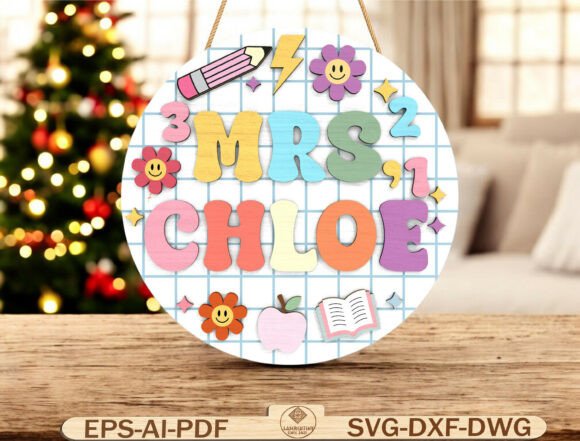
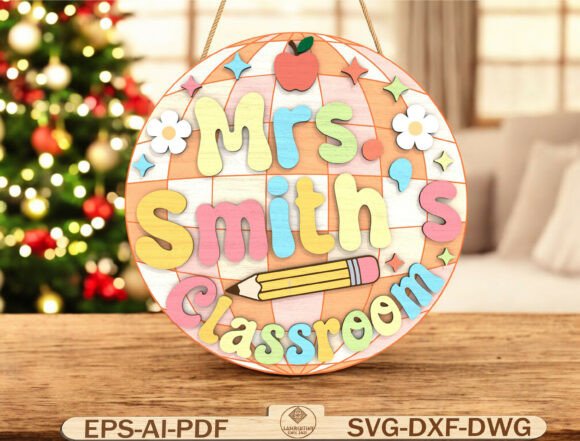
Featuring soft pastel lettering, a grid background, pencil icon, and floral accents, this design blends retro charm with modern usability. Whether you're preparing for a new school year or crafting a personalized gift for an educator, this laser-cut file offers a clean, layered structure that works seamlessly with Glowforge, Cricut, Silhouette, and CNC machines.
Why This Design Stands Out
The Back to School Retro Classroom Laser Cut is designed with both aesthetics and functionality in mind. Its round format provides a balanced, eye-catching shape that draws attention without overwhelming the space. The pastel color palette ensures a warm, inviting tone that appeals to both younger students and educators who appreciate a gentle, approachable design.
What makes this digital file especially useful is its adaptability. The teacher’s name can be easily swapped, allowing for personalized signs that reflect individual personalities. The layered 3D look adds depth without complicating the cutting process, making it ideal for laser or CNC projects that require clean, precise lines and a polished finish.
Creative Applications for Different Users
This design serves a variety of purposes beyond the classroom door. Here are some creative ways different users can apply the Back to School Retro Classroom Laser Cut:
- Teachers: Create a personalized name sign for your classroom door or desk to welcome students in a friendly, organized manner.
- Designers: Use it as a base for a themed classroom package, adding complementary elements like bulletin board borders or desk labels.
- Makers: Print and cut multiple versions in different materials like wood, acrylic, or MDF to offer as back-to-school gifts or market at teacher conventions.
- Bloggers: Feature the design in a roundup of DIY classroom décor ideas, highlighting how it can be customized for different grade levels or subjects.
- Small business owners: Offer laser-cut signs as part of a seasonal product line, targeting educators and parents looking for unique décor items.
Ideas for Customization and Style Variations
While the original design offers a soft, retro aesthetic, there are many ways to reinterpret it to suit different styles or themes:
- Bold and modern: Swap the pastel palette for bright, contrasting colors and a sans-serif font to give the sign a contemporary twist.
- Vintage classroom: Incorporate chalkboard textures or aged paper effects to enhance the retro feel.
- Minimalist: Remove the floral accents and simplify the background to focus on clean lines and typography.
- Seasonal variations: Update the icon set to match holidays or school events – think snowflakes for winter, leaves for fall, or stars for a space-themed classroom.
- Interactive elements: Add movable parts or layered components that students can interact with, such as rotating name tags or date displays.
How to Use This Design Across Formats and Platforms
The Back to School Retro Classroom Laser Cut comes in a variety of file formats (SVG, DXF, DWG, EPS, AI, PDF), making it compatible with a wide range of tools and machines. Here’s how different users can make the most of each format:
- Glowforge or xTool users: Import the SVG directly into your software for quick setup and precise cutting.
- Cricut or Silhouette owners: Use the SVG or DXF files to create smaller, layered signs using vinyl or thin wood.
- Graphic designers: Edit the AI or EPS files in Adobe Illustrator to adjust colors, fonts, or layout before exporting for print or laser cutting.
- Print-on-demand sellers: Convert the design into a printable poster or sticker using the PDF format, offering a physical product option alongside the digital file.
- Educators without cutting machines: Print the PDF version and use it as a template for hand-cutting or tracing onto foam board, cardboard, or felt.
Material and Size Recommendations
For best results, the design is recommended for sizes between 10–14 inches in diameter, with a material thickness of 3–6 mm. Here’s a breakdown of suitable materials and their benefits:
- Plywood: Offers a natural, durable finish with visible wood grain – perfect for a rustic or eco-friendly look.
- MDF: Provides a smooth surface ideal for painting or staining, making it great for custom color schemes.
- Acrylic: Adds a glossy, modern appearance with the option to backlight for a glowing effect.
- Wood: Can be stained or painted to match classroom themes and withstands wear and tear over time.
Practical Tips for a Polished Finish
To ensure your laser-cut or CNC-cut sign looks professional and lasts through multiple school years, consider these practical tips:
- Test cuts: Always run a test cut on scrap material before cutting your final piece, especially when using a new material or adjusting settings.
- Layer alignment: If your design includes multiple layers for a 3D effect, use registration marks or alignment tabs to ensure everything lines up perfectly.
- Finishing touches: Sand wood edges, apply a clear coat for durability, or use a light sandblasting technique on acrylic for a frosted effect.
- Mounting options: Add adhesive strips, sawtooth hangers, or keyhole slots to the back for easy, secure installation.
- Storage: If you’re making multiple signs, store them in labeled, flat containers to prevent warping or damage.
Designing for Different Audiences and Contexts
One of the strengths of the Back to School Retro Classroom Laser Cut is its ability to be adapted for various age groups, subjects, and educational settings. Here are a few examples:
- Preschool: Use oversized letters and bright colors to create a playful, engaging sign that helps young students identify their classroom.
- Elementary: Add a mascot or themed icon (like a rocket for science class or a book for reading) to align with subject-based décor.
- Special education: Customize the layout to include visual cues or symbols that support communication and orientation.
- Teacher appreciation: Create a framed version as a gift from students or parents, with a message or quote engraved beneath the name.
- Home schooling: Use the design as part of a home office or learning space, helping to create a dedicated, motivating environment.
Conclusion
The Back to School Retro Classroom Laser Cut is more than just a decorative SVG – it’s a flexible, reusable design that empowers educators, makers, and creators to bring personalized, professional-quality décor into the classroom and beyond. Whether you’re laser cutting a name sign for your own space or offering it as a downloadable product to others, this design balances creativity with practicality in a way that’s both inspiring and accessible.